GAME SOFTWARE / ROB RUNNN
NN
for Rob Run.
Undetected
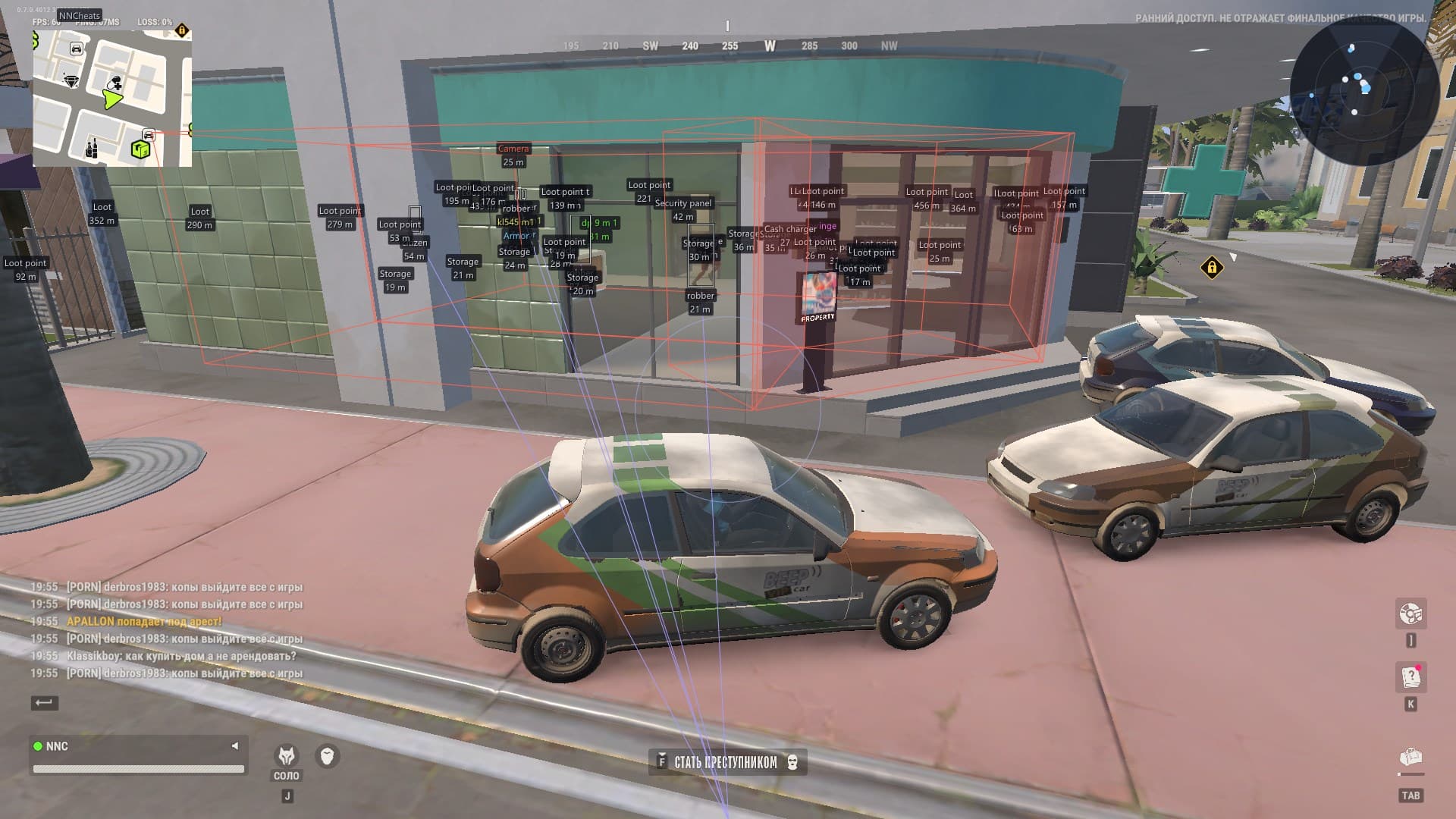
INSIDE THE PRODUCT / SCREENSHOTS AND VIDEO
Everything you need to know.
NN Rob Run includes aimbot, ESP for players, NPCs, vehicles, cameras and loot, radar, off-screen indicators, combat mode and saved configurations. Access for 1, 3, 7 or 30 days with automatic key delivery after payment. The full feature list is based on supplier information.
- Weapon profiles: General settings
- Weapon profiles: Pistols
- Weapon profiles: Assault rifles
- Weapon profiles: Other weapons
- Weapon profiles: Separate settings for each weapon category
- Activation: Enable
- Activation: Activation (Hold/Always)
- Activation: Activation key
- Activation: Only while aiming
- Activation: Forced aim key
- Target selection: Maximum distance
- Target selection: Target lock
- Target selection: Switch delay, ms
- Target selection: Ignore dead targets
- Target selection: Ignore downed targets
- Target selection: Ignore targets in vehicles
- Target selection: Head targeting with Shift
- Targets: Police officers
- Targets: Robbers
- Targets: Civilians
- Targets: Others
- Aim field: Field size, degrees
- Aim field: Adaptive field
- Aim field: FOV border
- Aim field: FOV background
- Aim field: Border thickness
- Aim field: Show target
- Aiming and prediction: Smoothing
- Aiming and prediction: Prediction
- Aiming and prediction: Prediction strength
- Aiming and prediction: Prediction point crosshair
- Aiming and prediction: Crosshair size
- Bones: Bone selection (Selected/Nearest)
- Bones: Head
- Bones: Neck
- Bones: Torso
- Bones: Pelvis
- Character categories: General settings
- Character categories: Police
- Character categories: Robbers
- Character categories: Civilians
- Character categories: Other characters
- Character categories: Separate display settings for each category
- Display: Enable
- Display: Distance, m
- Display: Label style (No background/With background)
- Display: Distance fading
- Box and skeleton: Box (None/Standard/Corner/3D)
- Box and skeleton: Box height
- Box and skeleton: Box width
- Box and skeleton: Fill (None/Solid/Gradient)
- Box and skeleton: Skeleton
- Box and skeleton: Skeleton thickness
- Box and skeleton: Head circle
- Lines: Line to character
- Lines: Line origin (Bottom/Center/Top)
- Lines: Line color
- Filters: Hide dead characters
- Filters: Hide allies
- Filters: Hide downed characters
- Information: Nickname
- Information: Clan tag
- Information: Role
- Information: Held item or weapon
- Information: Armor indicator
- Information: State
- Information: Health (when data is available)
- Information: In-vehicle indicator
- Information: Distance
- Information: ID
- Colors: Primary color
- Colors: Skeleton color
- Colors: Ally colors
- Colors: Ally color
- Colors: Ally skeleton
- State colors: Downed character colors
- State colors: Downed character color
- State colors: Downed character skeleton
- State colors: In-vehicle colors
- State colors: In-vehicle color
- State colors: In-vehicle skeleton
- Display: Enable
- Display: Maximum distance, m
- Display: Label style (No background/With background)
- Display: Box (None/Standard/Corner/3D)
- Filters: Hide dead characters
- Information: Name
- Information: State
- Information: Distance
- Display: Enable
- Display: Maximum distance, m
- Display: Label style (No background/With background)
- Display: Box (None/Standard/Corner/3D)
- Display: Box fill (None/Solid/Gradient)
- 3D box: Front face
- 3D box: Front face fill
- Lines: Line to vehicle
- Lines: Line origin (Bottom/Center/Top)
- Lines: Line color
- Information: Name
- Information: Owner
- Information: Driver
- Information: Speed
- Information: State
- Information: Distance
- Filters: Occupied vehicles only
- Filters: Hide own vehicle
- Filters: Hide character vehicle
- Colors: Color
- Display: Enable
- Display: Maximum distance, m
- Display: Distance
- Filters: Hide broken cameras
- View zones: View zone
- View zones: Zone fill
- Colors: Normal
- Colors: Broken
- Colors: Alarm
- Display: Enable
- Display: Maximum distance, m
- Display: Distance
- Filters: Hide empty objects
- Objects: Loot
- Objects: Loot points
- Objects: Cargo
- Objects: Cash
- Objects: Chargers
- Objects: Storages
- Objects: Security panels
- Item categories: Weapons
- Item categories: Ammunition
- Item categories: Armor
- Item categories: Equipment
- Item categories: Medical supplies
- Item categories: Valuables
- Item categories: Miscellaneous
- Item colors: Automatic item color detection
- Item colors: ESP label color matches the in-game item color
- General: Enable
- General: Maximum distance, m
- Size and scale: Scale
- Size and scale: Size
- Size and scale: Opacity
- Appearance: Distance rings
- Appearance: View sector
- Appearance: Size by distance
- Appearance: Show at edge
- Radar objects: Police officers
- Radar objects: Robbers
- Radar objects: Civilians
- Radar objects: Others
- Radar objects: NPC
- Radar objects: Vehicles
- General: Enable
- General: Maximum distance, m
- Size and position: Radius
- Size and position: Size
- Weapons: No recoil
- Weapons: No sway
- Weapons: No spread
- General: Activation key
- General: Indicator
- General: Compact information
- Hidden objects: Hide dead characters
- Hidden objects: Hide police
- Hidden objects: Hide robbers
- Hidden objects: Hide civilians
- Hidden objects: Hide others
- Hidden objects: Hide NPCs
- Hidden objects: Hide vehicles
- Hidden objects: Hide loot
- Interface elements: Hide radar
- Interface elements: Hide indicators
- Hotkeys: Menu key
- Hotkeys: Exit key
- Interface: Language (Russian/English/Chinese)
- Interface: Theme (Dark/Light)
- Interface: Interface scale (100%/125%/150%)
- Interface: Layout (Two columns/One column)
- Interface: Watermark
- Rendering: Display refresh synchronization
- Rendering: Overlay FPS limit
- Menu usability: Settings search (Ctrl+F)
- Menu usability: ESP preview with current settings
- Menu usability: Resize and move the menu window
- Saving: Configuration name
- Saving: Create configuration
- Saving: Save configuration
- Saving: Autosave current settings
- Management: Configuration list
- Management: Load
- Management: Rename
- Management: Delete
- General: Single EXE with a built-in offset scanner
- General: Profile freshness check at launch
- General: Automatic profile updates for supported game versions
- General: Reuse the current profile
- General: Launch the mod before or after the game
Still have questions about compatibility?We’ll help you figure it out
FEEDBACK / CHEATS STORE
Customer experience.
Reviews
Your experience belongs here
No reviews yet. Share your experience after buying to help others choose.