GAME SOFTWARE / ROB RUNVengeance Rob Run Full
Vengeance Rob Run Full
for Rob Run.
Undetected
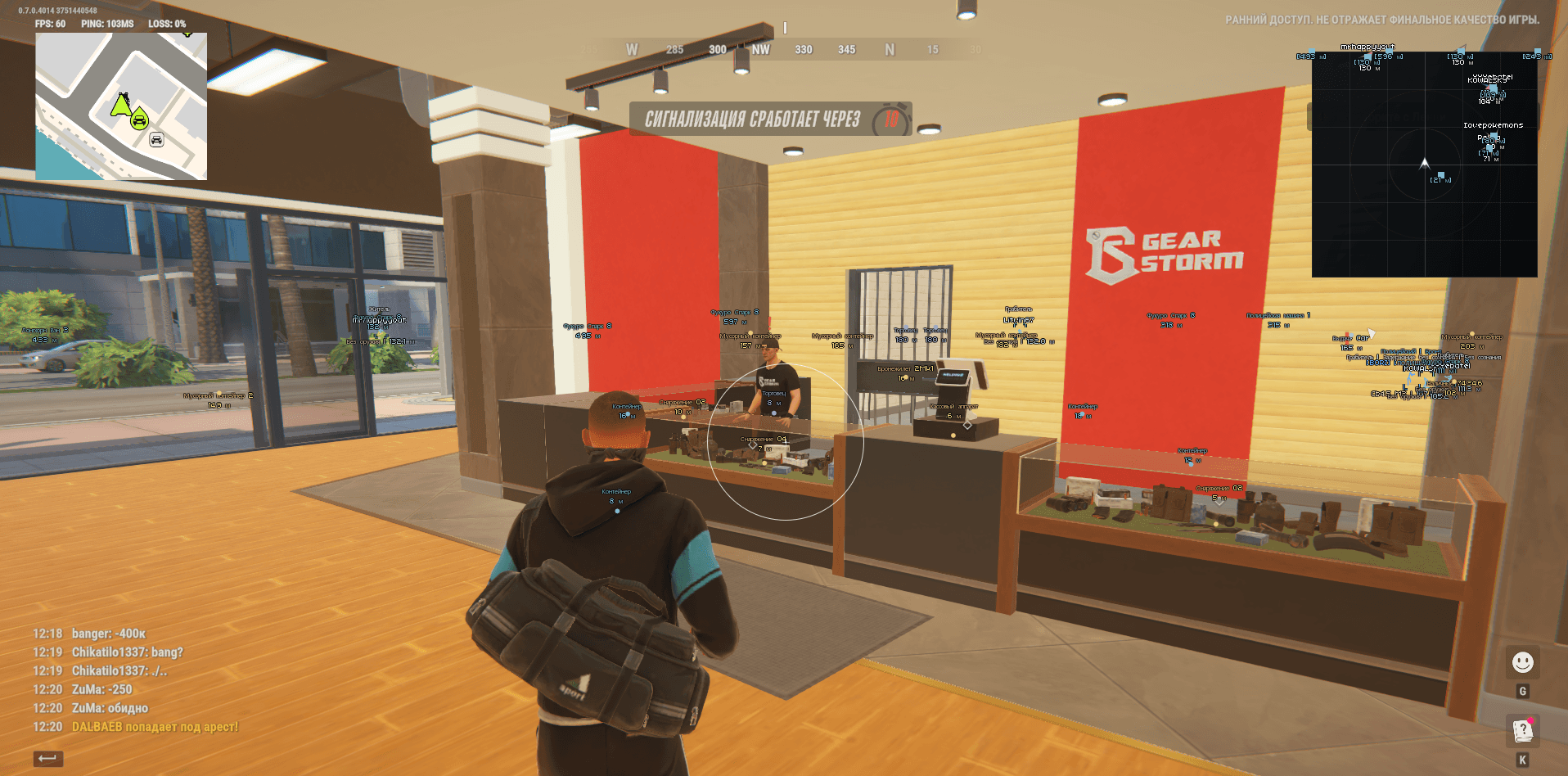
INSIDE THE PRODUCT / SCREENSHOTS AND VIDEO
Everything you need to know.
Vengeance Rob Run Full includes aiming, player and equipment ESP, vehicles, loot, cameras and world objects. Features radar with smooth auto zoom, BattleMode, color palettes and configuration profiles. Based on developer documentation dated November 7, 2026. Key availability is shown with the access plans.
- Right Shift opens or closes the menu; aiming pauses while the menu is open.
- F4 continues the normal startup sequence; it does not open the menu.
- Full edition: aiming, ESP, world objects, radar, BattleMode and configuration profiles.
- Overlay enabled controls visual layers separately from the aim switch.
- Menu sections: Aim, Visuals, World, Radar, Miscellaneous and Configs.
- Aiming while holding the assigned key with the game focused; disabled by default.
- Keyboard key or mouse button; defaults to the right mouse button. Escape cancels binding.
- FOV from 10–500 pixels, selection of a suitable target nearest the center and a configurable FOV circle color.
- Smoothing 1–30, range 10–1000 m; target bone: pelvis, chest, neck or head.
- NPC targeting; the local character and dead targets are excluded. Current camera and bone data are required.
- Aiming stops when the key is released, the menu opens, focus is lost or data becomes stale.
- Keeps enemies in ESP and radar, hides world labels and vehicles; saved category switches are preserved.
- Combat mode indicator beside the radar; configurable key, F6 by default.
- One press toggles once; the binding works with the game focused and menu closed, and is saved in the config.
- Clan battles use actual attacker and defender teams; an unknown team is not assumed hostile.
- In the open world, the local non-empty clan is hidden; police are allies when playing as police. Dead characters and ordinary NPCs are excluded.
- Police NPCs can remain enemies for a non-police role; the separate Police filter still applies.
- Nicknames, clan tags, COP label, ID, distance and available character roles.
- Full or Corners boxes, a smoothed skeleton based on measured joints and line thickness from 1–4.
- A health bar only when current and maximum HP are available; unknown values are not fabricated.
- Player ESP range 10–1000 m; independent police, ordinary NPC, dead player and local player filters.
- Held weapon or item, armor presence indicator and available extra values; a separate full armor bar is not claimed.
- Available states: shooting, running, crouching, reloading, arrest and downed.
- ESP preview in the menu; brief gaps in measured poses are covered for up to 150 ms, while model or scene changes reset the state.
- Cars and helicopters: name, distance and 3D boxes when dimensions and orientation are available.
- World vehicle ESP range 20–1500 m; detail range 10–500 m.
- Available owner name or availability label, plus the number of detected passengers.
- Engine state, cargo presence and speed in km/h when the data is available.
- Radar vehicles are toggled independently of world vehicle ESP.
- Loose items, cash, loot nodes, bags and available vehicle remains; known quantities and amounts are included in labels.
- Containers and available furniture, construction and property storages; a separate cargo object layer.
- Show empty or taken objects based on available state; unknown state is not treated as empty.
- Item distance and general World distance: 10–1000 m.
- Name and distance on two lines; overlapping label filtering with item labels prioritized over vehicles.
- Russian names for items, containers, displays and cars; weapon model codes, nicknames and owner names are preserved.
- After a read failure, the last valid label can remain for up to 1.5 s; confirmed removal is applied immediately.
- Displaying a loot node does not mean showing the complete contents of every container.
- Security cameras and broken-state labels when available; camera video feeds are not claimed.
- Guard posts, alarms, security panels, medical cabinets and medical points.
- Doors, supported storages, additional interactions and points of interest.
- Traders, vehicle spawn points, hideouts and available workstations.
- Separate bank and roulette switches; cameras are cached and may not appear immediately.
- Grid, character markers and local direction arrow; a full location map background is not claimed in this version.
- Camera rotation, size 100–400 px, manual zoom 0.05–5.00 and X/Y positioning.
- Character view or body direction; distant contacts are clamped to the border and dimmed.
- Contact name and distance labels, vehicle icons and independent police and NPC filters.
- Player radar works independently of 3D ESP; vehicles are hidden in BattleMode.
- Smooth zoom toward a suitable nearby living character, returning to manual zoom when the contact moves away.
- Reaction range 30–500 m, maximum zoom 0.05–5.00 and response time 0.15–2.00 s.
- Ignores the local non-empty clan, dead characters, ordinary NPCs and allied police; respects BattleMode filtering.
- Manual zoom is preserved; auto zoom does not shrink the image below the base zoom.
- Separate colors for players, police, weapons, skeletons, health, vehicles and world categories; adjustable opacity.
- FOV and menu accent colors, with palette reset via a button.
- Russian and English UI with label and name changes without restarting.
- Menu scale 75% or 85%, screen fitting, animated background and bilingual settings search.
- Diagnostics for entity counts, read time and snapshot age; game layers render below the menu.
- The 9–20 px label size slider does not guarantee scaling every label in the native renderer.
- Named JSON profiles: create, save, load, rename, delete and refresh list.
- Saves display, aiming, radar, BattleMode binding, colors and interface settings.
- Default autosave: C:\Windows\System\robrun.json; named profiles: C:\Windows\System\configs_robrun.
- After the game has been confirmed absent for 2 seconds, the session stops and Discord.exe processes are closed.
- Manual Ctrl+F4 pause while the game is running does not close Discord.
Still have questions about compatibility?We’ll help you figure it out
Compare other products
FEEDBACK / CHEATS STORE
Customer experience.
Reviews
Your experience belongs here
No reviews yet. Share your experience after buying to help others choose.